
Kato Integrations Kato Integrations
  • RPG API Express
  • Toolkits
    • Address Toolkit for i
    • CyberSource Toolkit for i
    • UPS Toolkit for i
    • Image Processor for i
  • Kato Spaces
  • RPG API Express
    • Address Toolkit for i
    • CyberSource Toolkit for i
    • UPS Toolkit for i
    • Image Processor for i
  • Kato Spaces
  • RXS 3.0.x Documentation
  • 3.0.xAll versions
    • System Requirements
    • Install
    • Upgrade
    • Uninstall
    • Replication Instructions
    • License Transfer
    • Changelog
    • Major Differences in RXS 3.x+
    • RXS_Catch()
    • RXS_ComposeSection()
    • RXS_ComposeVariable()
    • RXS_Convert()
    • RXS_Crypt()
    • RXS_GetComposeBuffer()
    • RXS_GetEnvVar()
    • RXS_GetJobCcsid()
    • RXS_GetStdIn()
    • RXS_GetStmf()
    • RXS_GetUrlVar()
    • RXS_JobLog()
    • RXS_Parse()
    • RXS_ProcessStmf()
    • RXS_PutEnvVar()
    • RXS_PutStdOut()
    • RXS_PutStmf()
    • RXS_StartComposeEngine()
    • RXS_Throw()
    • RXS_Transmit()
    • Apply License (APYLIC)
    • Display License (DSPLIC)
    • Display Machine Info (DSPMCHINF)
    • Display Version (DSPVER)
    • RXSMENU
    • Create RXS Server (CRTRXSSVR)
    • Process HTTP Server Instance (HTTP)
    • RXS Router (RXSRTR)
    • Create RXSRTR Environment (CRTRXSRTRE)
    • Work with RXSRTR Entries (WRKRXSRTRE)
    • Initialize RXS Router (INZRXSRTR)
    • Build Template (BLDTPL)
    • Create RPG Template (CRTRPGTPL)
    • Build Parsing Subprocedure (BLDPRS)
    • Creating an RXS Template
    • Creating an XML Parsing Subprocedure
    • Configuring RXS Router
    • CELSIUS
All Products
  1. Home
  2. RPG API Express
  3. RXSMENU
Version3.03.13.23.33.43.5

RXSMENU

The RXSMENU menu can be used to retrieve information about your RPG-XML Suite installation, or to work with your product license keys.
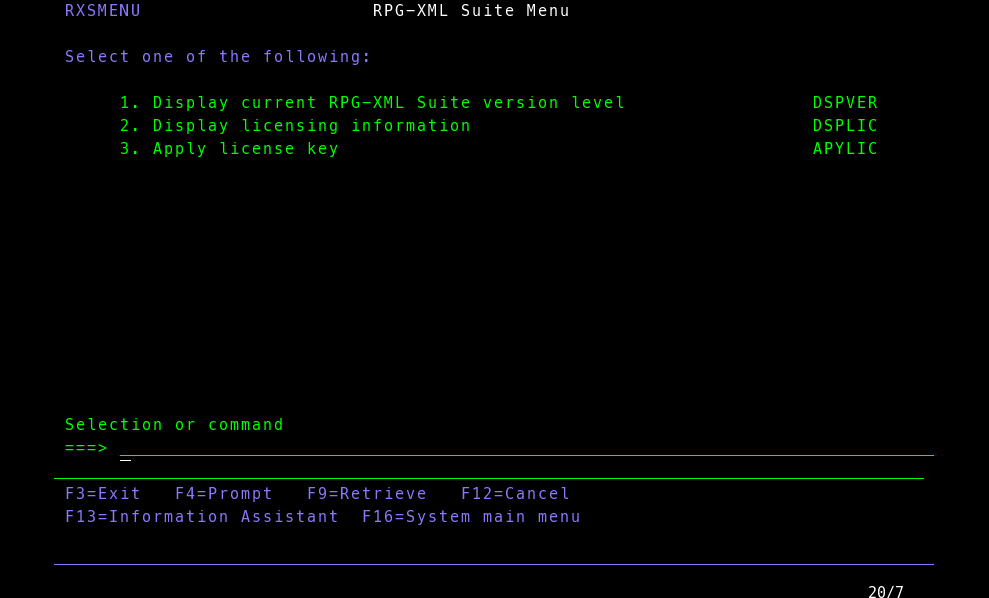

RXSMENU

View as Markdown
RXSMENU
Press Esc to close  |  Ctrl+K to toggle
Kato Integrations
(800) 573-6435 | isupport@katointegrations.com